Polyline
A polyline is a sequence of line segments connecting multiple geographic points. Polylines are commonly used to represent routes, paths, boundaries, or linear features on a map.
Composable Functions
For a small number of polylines, you can specify options directly. Specifying an id helps prevent unnecessary recomposition.
@Composablefun Polyline( points: List<GeoPointInterface>, id: String? = null, strokeColor: Color = Color.Black, strokeWidth: Dp = 1.dp, geodesic: Boolean = false, extra: Serializable? = null)For a large number of polylines or when moving polylines, using state is recommended. Specifying an id helps prevent unnecessary recomposition.
PolylineState(    points: List<GeoPointInterface>,    id: String? = null,    strokeColor: Color = Color.Black,    strokeWidth: Dp = 1.dp,    geodesic: Boolean = false,    extra: Serializable? = null)
@Composablefun Polyline(state: PolylineState)
Parameters
points: List of geographic coordinates defining the line segment (List<GeoPointInterface>)id: Optional unique identifier for the polyline (String?)strokeColor: Color of the line (default:Color.Black)strokeWidth: Width of the line (default:1.dp)geodesic: Whether to draw the line using geodesic edges that follow the Earth’s curvature (default:false)extra: Additional data attached to the polyline (Serializable?)
Usage Examples
Basic Polyline
@Composablefun BasicPolylineExample(modifier: Modifier = Modifier) {    val center = GeoPoint.fromLatLong(53.566853, 9.988269)
    // 地図の作成    val camera =        MapCameraPosition(            position = center,            zoom = 14,        )    val mapViewState =        rememberMapboxMapViewState(            cameraPosition = camera,        )    val routePoints = listOf(        GeoPoint.fromLatLong(53.561011,9.989448),        GeoPoint.fromLatLong(53.563203,9.985800),        GeoPoint.fromLatLong(53.564579,9.983525),        GeoPoint.fromLatLong(53.566873,9.980822),        GeoPoint.fromLatLong(53.567943,9.982152),        GeoPoint.fromLatLong(53.570186,9.984813),        GeoPoint.fromLatLong(53.572683,9.986143),        GeoPoint.fromLatLong(53.572658,9.988675),        GeoPoint.fromLatLong(53.572709,9.990392)    )
    // Replace MapView with your chosen map provider, such as GoogleMapView, MapboxMapView    MapboxMapView(        state = mapViewState,        modifier = modifier,    ) {        Polyline(            points = routePoints,            strokeColor = Color.Blue,            strokeWidth = 9.dp        )    }}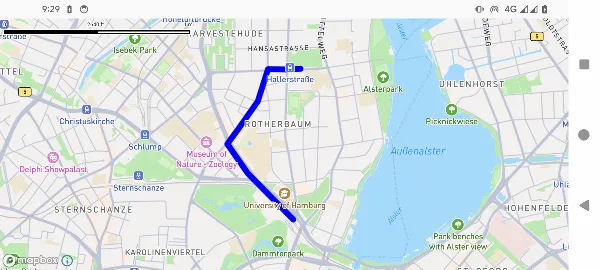
Interactive Polyline with Waypoint Markers
@Composablefun InteractivePolylineExample() {    val center = GeoPoint.fromLatLong(53.566853, 9.988269)
    val camera = MapCameraPosition(position = center, zoom = 14.0)    val mapViewState = rememberMapboxMapViewState(cameraPosition = camera)
    var waypoints by remember {        mutableStateOf(            listOf(                GeoPoint.fromLatLong(53.561011, 9.989448),                GeoPoint.fromLatLong(53.563203, 9.985800),                GeoPoint.fromLatLong(53.564579, 9.983525),                GeoPoint.fromLatLong(53.566873, 9.980822),                GeoPoint.fromLatLong(53.567943, 9.982152),                GeoPoint.fromLatLong(53.570186, 9.984813),                GeoPoint.fromLatLong(53.572683, 9.986143),                GeoPoint.fromLatLong(53.572658, 9.988675),                GeoPoint.fromLatLong(53.572709, 9.990392)            )        )    }
    val polylineState = PolylineState(        points = waypoints,        strokeColor = Color.Blue,        strokeWidth = 4.dp,        geodesic = true    )
    val onWaypointDrag: (MarkerState) -> Unit = { markerState ->        val markerIndex = markerState.extra as Int        markerIndex.let { index ->            waypoints = waypoints.toMutableList().apply {                if (index < size) {                    set(index, markerState.position as GeoPoint)                }            }        }    }
    val waypointMarkers = waypoints.mapIndexed { index, point ->        MarkerState(            id = "marker-${index}",            position = point,            icon = ColorDefaultIcon(label = "${index + 1}", scale = 0.7f),            draggable = true,            extra = index,            onDrag = onWaypointDrag        )    }
    MapboxMapView(        state = mapViewState    ) {        Polyline(polylineState)        waypointMarkers.forEach { marker ->            Marker(marker)        }    }}
Dynamic Polyline Construction
@Composablefun DynamicPolylineExample() {    val center = GeoPoint.fromLatLong(53.566853, 9.988269)
    val camera = MapCameraPosition(position = center, zoom = 14.0)    val mapViewState = rememberMapLibreMapViewState(cameraPosition = camera)
    var points by remember { mutableStateOf<List<GeoPointInterface>>(emptyList()) }    var isDrawing by remember { mutableStateOf(false) }
    Column(modifier = modifier) {        Row {            Button(onClick = { isDrawing = !isDrawing }) {                Text(if (isDrawing) "Stop Drawing" else "Start Drawing")            }            Button(onClick = { points = emptyList() }) {                Text("Clear")            }        }
        MapLibreMapView(            state = mapViewState,            onMapClick = { geoPoint ->                if (isDrawing) {                    points = points + geoPoint                }            }        ) {            if (points.isNotEmpty()) {                Polyline(                    points = points,                    strokeColor = Color.Red,                    strokeWidth = 3.dp                )
                points.forEachIndexed { index, point ->                    Marker(                        position = point,                        icon = ColorDefaultIcon(                            fillColor = if (index == 0) Color.Green                            else if (index == points.size - 1) Color.Red                            else Color.Blue,                            label = "${index + 1}",                            scale = 0.8f                        )                    )                }            }        }    }}
Geodesic vs Standard Lines
@Composablefun GeodesicPolylineExample(modifier: Modifier = Modifier) {    val center = GeoPoint.fromLatLong(36.0, -160.0)    val camera = MapCameraPosition(position = center, zoom = 4.0)    val mapViewState = rememberMapboxMapViewState(cameraPosition = camera)
    var markers by remember { mutableStateOf<List<MarkerState>>(emptyList()) }    val onPolylineClick: OnPolylineEventHandler = { polylineEvent ->        markers = markers + MarkerState(            icon = ColorDefaultIcon(fillColor = polylineEvent.state.strokeColor),            position = polylineEvent.clicked        )    }
    MapboxMapView(        state = mapViewState,        modifier = modifier    ) {        val longDistancePoints = listOf(            GeoPoint.fromLatLong(35.548852, 139.784086), // 羽田空港            GeoPoint.fromLatLong(37.615223, -122.389979)   // サンフランシスコ空港        )
        // 標準線        Polyline(            id = "straight-line",            points = longDistancePoints,            strokeColor = Color.Red,            strokeWidth = 3.dp,            geodesic = false,            extra = "Straight line",            onClick = onPolylineClick        )
        // 測地線        Polyline(            id = "geodesic-line",            points = longDistancePoints,            strokeColor = Color.Blue,            strokeWidth = 3.dp,            geodesic = true,            extra = "Geodesic line",            onClick = onPolylineClick        )
        markers.forEach { markerState ->            Marker(markerState)        }    }}
Event Handling
Polyline interactions are handled by your map provider component:
// Replace MapView with your chosen map provider, such as GoogleMapView, MapboxMapViewMapView(    state = mapViewState) {    Polyline(        points = routePoints,        strokeColor = Color.Blue,        strokeWidth = 4.dp,        extra = "Interactive route",        onClick = { polylineEvent ->            val polyline = polylineEvent.state            val clickPoint = polylineEvent.clicked
            println("Polyline clicked:")            println("  Points count: ${polyline.points.size}")            println("  Click location: ${clickPoint}")            println("  Extra data: ${polyline.extra}")        }    )}
Styling Options
Line Width Variations
// Thin linePolyline(    points = points,    strokeWidth = 1.dp)
// Medium linePolyline(    points = points,    strokeWidth = 3.dp)
// Thick linePolyline(    points = points,    strokeWidth = 8.dp)
Color Variations
// Solid colorsPolyline(points = points, strokeColor = Color.Red)Polyline(points = points, strokeColor = Color.Blue)Polyline(points = points, strokeColor = Color.Green)
// Semi-transparentPolyline(points = points, strokeColor = Color.Red.copy(alpha = 0.7f))
// Custom colorPolyline(    points = points,    strokeColor = Color(0xFF4CAF50) // Material green)
Best Practices
- Point Density: Balance detail and performance - too many points can slow down rendering
- Geodesic Lines: Use geodesic for long-distance routes to display accurate paths
- Visual Hierarchy: Use different colors and widths to distinguish different types of routes
- Interactive Feedback: Provide visual feedback when polylines are clickable
- Performance: Consider using simplified geometry for complex polylines at specific zoom levels
- Color Contrast: Ensure the polyline color stands out against the map background
- Route Direction: Consider adding arrows or markers along the route to indicate direction
- State Management: Efficiently store and reactively update polyline data as needed