MapViewComponent
MapConductor provides map provider-specific map view components that serve as the foundation for displaying maps in your application. Each map SDK has its own implementation, but a consistent API interface is maintained across all providers.
MapViewContainer Architecture
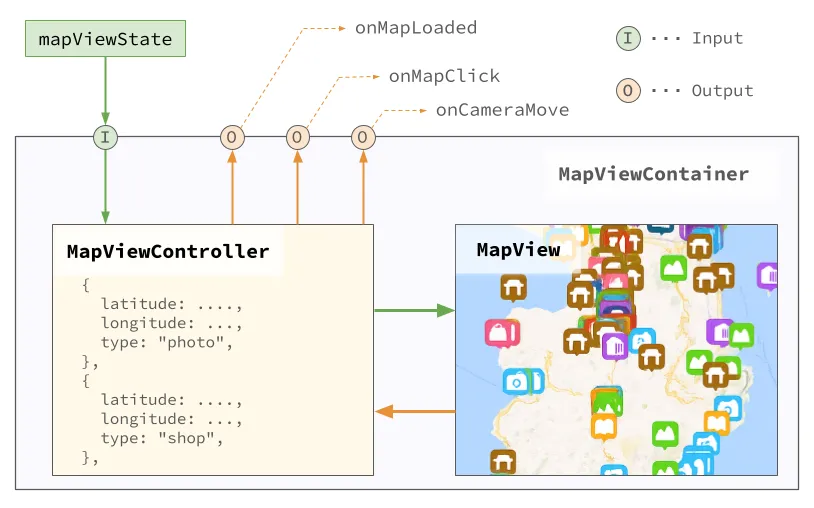
MapConductor provides a MapViewContainer component that wraps the MapView provided by the map SDK.
MapViewComponent is a conceptual layer; when actually used, it employs the XxxMapView provided by each map SDK (e.g., GoogleMapView, MapBoxView, etc.).
MapViewComponent contains controls for managing the MapView. These controls can be manipulated through the MapViewStateInterface.
Map Provider-Specific Components
MapConductor supports multiple map SDKs, each with a dedicated component. Multiple objects (markers, polylines, etc.) are typically placed on a map, so rather than setting event callbacks on individual objects, map and camera callbacks are set on the map provider-specific component, while overlay callbacks are set on each State.
Provider-specific special event callbacks are not yet supported in v1.1.7.
GoogleMapView( state: GoogleMapViewState, modifier: Modifier = Modifier, onMapLoaded: OnMapLoadedHandler? = null, onMapClick: OnMapEventHandler? = null, onCameraMoveStart: OnCameraMoveHandler? = null, onCameraMove: OnCameraMoveHandler? = null, onCameraMoveEnd: OnCameraMoveHandler? = null, content: (@Composable () -> Unit)? = null)MapboxMapView( state: MapboxViewState, modifier: Modifier = Modifier, onMapLoaded: OnMapLoadedHandler? = null, onMapClick: OnMapEventHandler? = null, onCameraMoveStart: OnCameraMoveHandler? = null, onCameraMove: OnCameraMoveHandler? = null, onCameraMoveEnd: OnCameraMoveHandler? = null, content: (@Composable () -> Unit)? = null)ArcGISMapView( state: ArcGISMapViewState, modifier: Modifier = Modifier, onMapLoaded: OnMapLoadedHandler? = null, onMapClick: OnMapEventHandler? = null, onCameraMoveStart: OnCameraMoveHandler? = null, onCameraMove: OnCameraMoveHandler? = null, onCameraMoveEnd: OnCameraMoveHandler? = null, content: (@Composable () -> Unit)? = null)HereMapView( state: HereViewState, modifier: Modifier = Modifier, onMapLoaded: OnMapLoadedHandler? = null, onMapClick: OnMapEventHandler? = null, onCameraMoveStart: OnCameraMoveHandler? = null, onCameraMove: OnCameraMoveHandler? = null, onCameraMoveEnd: OnCameraMoveHandler? = null, content: (@Composable () -> Unit)? = null)MapLibreMapView( state: MapLibreViewState, modifier: Modifier = Modifier, onMapLoaded: OnMapLoadedHandler? = null, onMapClick: OnMapEventHandler? = null, onCameraMoveStart: OnCameraMoveHandler? = null, onCameraMove: OnCameraMoveHandler? = null, onCameraMoveEnd: OnCameraMoveHandler? = null, content: (@Composable () -> Unit)? = null)Common Parameters
All map view components share the following parameters:
Core Parameters
modifier: Compose modifier for styling and layoutstate: Map provider-specific map view state implementationcontent: Composable content containing map overlays (markers, circles, etc.)
Event Handlers
onMapLoaded: Called when the map has finished loadingonMapClick: Called when the user taps on the maponCameraMoveStart: Called whenmoveCameraTo(dst, durationMs)begins. Not called when the user moves the map interactively.onCameraMove: Called when the camera displaying the map moves.onCameraMoveEnd: Called when the movement of the camera displaying the map completes.
Advanced Parameters
sdkInitialize: SDK-specific initialization process
Usage Examples
@Composablefun GoogleMapsExample() {    val center = GeoPoint.fromLatLong(37.7749, -122.4194)    val camera = MapCameraPosition(position = center, zoom = 13)
    // ↓↓↓ Use rememberGoogleMapViewState for Google Maps    val mapViewState = rememberGoogleMapViewState(cameraPosition = camera)
    // ↓↓↓ Use GoogleMapView for Google Maps    GoogleMapView(        state = mapViewState,        onMapClick = { geoPoint ->            println("Map clicked at: ${geoPoint.latitude}, ${geoPoint.longitude}")        }    ) {        Marker(            position = GeoPoint.fromLatLong(37.7749, -122.4194),            icon = ColorDefaultIcon(label = "SF"),            extra = "San Francisco",            onClick = { markerState ->                println("Marker clicked: ${markerState.extra}")            }        )
        Circle(            center = GeoPoint.fromLatLong(37.7749, -122.4194),            radiusMeters = 1000.0,            strokeColor = Color.Blue,            fillColor = Color.Blue.copy(alpha = 0.3f)        )    }}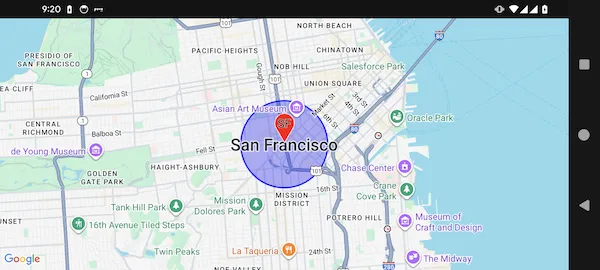
@Composablefun MapboxExample() {    val center = GeoPoint.fromLatLong(37.7749, -122.4194)    val camera = MapCameraPosition(position = center, zoom = 13)
    // ↓↓↓ Use rememberMapboxMapViewState for MapBox    val mapViewState = rememberMapboxMapViewState(cameraPosition = camera)
    // ↓↓↓ Use MapboxMapView for MapBox    MapboxMapView(        state = mapViewState,        onMapClick = { geoPoint ->            println("Map clicked at: ${geoPoint.latitude}, ${geoPoint.longitude}")        }    ) {        Marker(            position = GeoPoint.fromLatLong(37.7749, -122.4194),            icon = ColorDefaultIcon(label = "SF"),            extra = "San Francisco",            onClick = { markerState ->                println("Marker clicked: ${markerState.extra}")            }        )
        Circle(            center = GeoPoint.fromLatLong(37.7749, -122.4194),            radiusMeters = 1000.0,            strokeColor = Color.Blue,            fillColor = Color.Blue.copy(alpha = 0.3f)        )    }}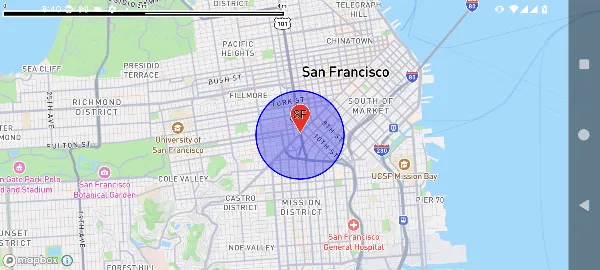
Map Provider-Independent Pattern
While specific map components are required for each SDK, you can create provider-independent content:
@Composablefun MapContent() {    Marker(        position = GeoPoint.fromLatLong(37.7749, -122.4194),        icon = ColorDefaultIcon(label = "Point"),        extra = "Common marker"    )
    Circle(        center = GeoPoint.fromLatLong(37.7749, -122.4194),        radiusMeters = 500,        strokeColor = Color.Green,        fillColor = Color.Green.copy(alpha = 0.2f)    )}
@Composablefun GoogleMapsScreen() {    val state = rememberGoogleMapViewState()    GoogleMapView(state = state) {        MapContent() // Reusable content    }}
@Composablefun MapboxScreen() {    val state = remember { MapboxViewState() }    MapboxMapView(state = state) {        MapContent() // Same content, different map SDK    }}
Advanced Event Handling
@Composablefun AdvancedMapExample() {    val center = GeoPoint.fromLatLong(37.7749, -122.4194)    val mapViewState = rememberGoogleMapViewState(        cameraPosition = MapCameraPosition(position = center, zoom = 13)    )
    var clickedPoint by remember { mutableStateOf<GeoPointInterface?>(null) }    val onMarkerClick: (MarkerState) -> Unit = { markerState ->        println("Marker clicked: ${markerState.extra}")    }
    GoogleMapView(        state = mapViewState,        onMapLoaded = {            println("Map loaded successfully")        },        onMapClick = { geoPoint ->            clickedPoint = geoPoint            println("Map clicked at: ${geoPoint.latitude}, ${geoPoint.longitude}")        },        onCameraMoveStart = {            println("Camera move started")        },        onCameraMove = { cameraPosition ->            println("Camera position: ${cameraPosition.position}")        },        onCameraMoveEnd = {            println("Camera move ended")        }    ) {        // Show marker and circle        Marker(            position = center,            icon = ColorDefaultIcon(label = "Center", fillColor = Color.Red),            extra = "Center marker",            onClick = onMarkerClick        )
        Circle(            center = center,            radiusMeters = 1000,            strokeColor = Color.Blue,            fillColor = Color.Blue.copy(alpha = 0.2f)        )
        // Show marker at clicked position        clickedPoint?.let { point ->            Marker(                position = point,                icon = ColorDefaultIcon(label = "Clicked", fillColor = Color.Green),                extra = "Clicked point",                onClick = onMarkerClick            )        }    }}
Map SDK Differences
While the API is consistent across all map SDKs, there are differences in the following areas:
Supported Features
- GroundImage: Currently supported on Google Maps and ArcGIS
- Marker Animation: Available on Google Maps and Mapbox
- Custom Styling: Each map SDK has different map style options
Performance Characteristics
- Google Maps: Excellent for general use with great marker performance
- Mapbox: Optimal for custom styling and large datasets
- HERE Maps: Optimized for location services integration
- ArcGIS: Optimal for GIS and enterprise applications
Platform Integration
Each map SDK may have different requirements regarding API keys, permissions, and platform setup. Refer to the provider-specific setup documentation for details.
Best Practices
- Choose the Right SDK: Select based on your app’s specific needs (styling, performance, features)
- Consistent State Management: Use the same state patterns regardless of the map SDK
- Reusable Content: Create provider-independent Composable content when possible
- Event Handling: Implement comprehensive event handling for better user experience
- Error Handling: Always handle initialization failures and provide fallback UI
- Performance: Consider custom rendering strategies for large marker sets
- Testing: Test your application with multiple map SDKs to ensure compatibility