GroundImage
GroundImage は、地図上に地理的に配置される画像オーバーレイです。フロアプラン、衛星画像、気象オーバーレイ、または特定の地理座標に固定する必要がある画像ベースのデータを表示するのに便利です。
Composable 関数
Section titled “Composable 関数”@Composablefun MapViewScope.GroundImage( bounds: GeoRectBounds, image: Drawable, opacity: Float = 0.5f, id: String? = null, extra: Serializable? = null)@Composablefun MapViewScope.GroundImage(state: GroundImageState)bounds: 画像を配置する地理的な矩形境界(GeoRectBounds)image: 表示する drawable 画像(Drawable)opacity: 透明度レベル、0.0(透明)から 1.0(不透明)まで(デフォルト:0.5f)id: GroundImage のオプションの一意識別子(String?)extra: GroundImage に付加する追加データ(Serializable?)
基本的な GroundImage
Section titled “基本的な GroundImage”@Composablefun BasicGroundImageExample( drawable: Drawable, modifier: Modifier = Modifier,) { val mapViewState = rememberGoogleMapViewState( cameraPosition = MapCameraPosition( position = GeoPoint(51.511649,-0.100761), zoom = 12.0, ), )
val bounds = GeoRectBounds( southWest = GeoPoint.fromLatLng(51.476747, -0.167729), northEast = GeoPoint.fromLatLng(51.546550,-0.033792), ) GoogleMapView( modifier = modifier, state = mapViewState, ) { GroundImage( id = "groundimage", bounds = bounds, image = drawable, opacity = 0.6f ) }}.jpg)
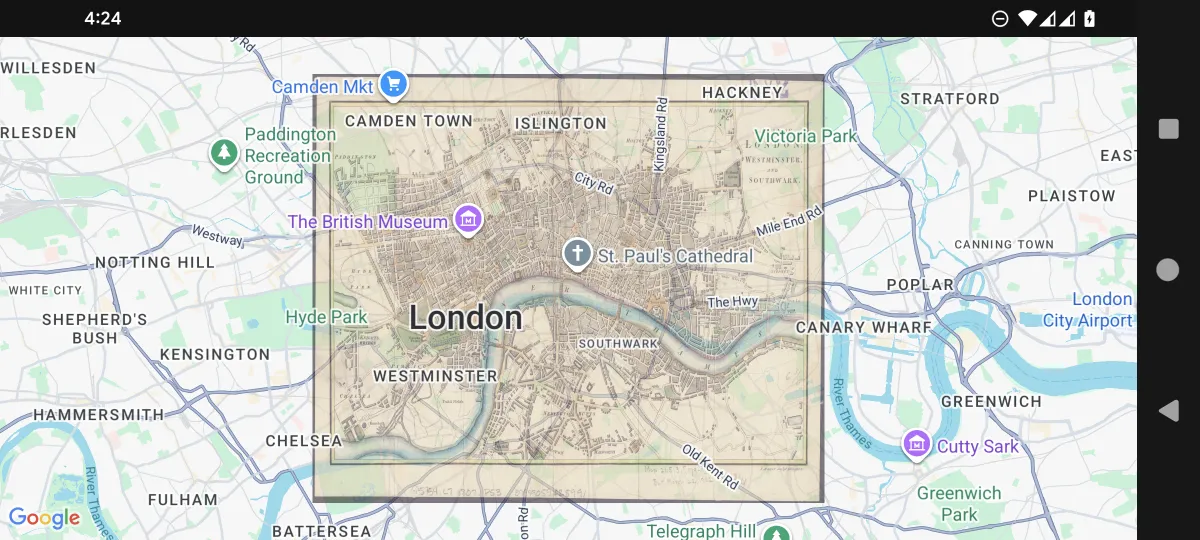
境界マーカー付きのインタラクティブな GroundImage
Section titled “境界マーカー付きのインタラクティブな GroundImage”@Composablefun MapView( drawable: Drawable, modifier: Modifier = Modifier,) { val mapViewState = rememberGoogleMapViewState( cameraPosition = MapCameraPosition( position = GeoPoint(51.511649,-0.100761), zoom = 12.0, ), )
var marker1 by remember { mutableStateOf(MarkerState( position = GeoPoint.fromLatLong(51.476747,-0.167729), draggable = true, )) } var marker2 by remember { mutableStateOf(MarkerState( position = GeoPoint.fromLatLong(51.546550,-0.033792), draggable = true, )) } val bounds = GeoRectBounds( southWest = marker1.position as GeoPoint, northEast = marker2.position as GeoPoint, ) var opacity by remember { mutableStateOf(0.7f) }
Column( modifier = modifier, ) { Slider( value = opacity, onValueChange = { opacity = it }, valueRange = 0f..1f, modifier = Modifier.padding(16.dp) ) GoogleMapView( state = mapViewState, ) { Marker(marker1) Marker(marker2) GroundImage( id = "groundimage", bounds = bounds, image = drawable, opacity = opacity ) } }}イベント処理
Section titled “イベント処理”GroundImage のインタラクションは、マップ地図SDKコンポーネントで処理されます:
@Composablefun GroundImageEventHandlingExample(overlayImage: Drawable) {    val mapViewState = rememberGoogleMapViewState()
    GoogleMapView(        state = mapViewState    ) {        val imageBounds = GeoRectBounds(            northWest = GeoPoint.fromLatLong(37.8, -122.5),            southEast = GeoPoint.fromLatLong(37.7, -122.4)        )
        GroundImage(            bounds = imageBounds,            image = overlayImage,            opacity = 0.7f,            extra = "Base map overlay",            onClick = { groundImageEvent ->                println("Ground image clicked at: ${groundImageEvent.clicked}")                println("Ground image: ${groundImageEvent.state}")            }        )    }}